
Trucker Path: Truck GPS & Fuel
Trucker PathMaps & Navigation
4.722.80K Reviews
- Version
- 7.1.9
- Installs
- 5.00M
- Age Rating
- Everyone
Screenshots
Our Review of Trucker Path: Truck GPS & Fuel
 Analysis by Appyee
For a truck driver, a route is more than a line between two addresses: it has to work for the vehicle, the schedule, and the next stop. I’d treat Trucker Path: Truck GPS & Fuel as a planning companion for those decisions, not as a reason to stop checking road signs or using professional judgment. Its focus on truck navigation, fuel, parking, and weigh stations makes it more relevant to freight work than a general map app, especially when the details of a stop matter as much as the turn-by-turn route.
Start with the route, then plan the working day
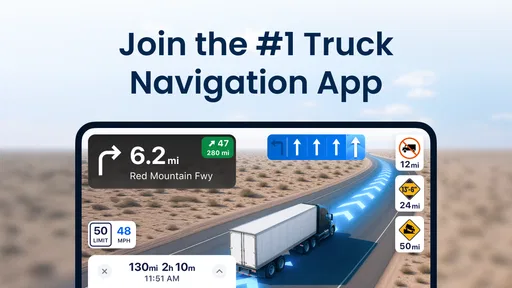
My practical starting routine would be to enter the destination before setting out, review the proposed truck route, and then think through where a fuel stop or break could fit. That order matters: choosing a convenient-looking stop first can leave you with a poor route or an awkward detour later. The app is designed to account for truck-related constraints such as clearance and weight limits, which is the central reason to use it instead of relying on an ordinary car-navigation app.
I would still compare the route with the truck’s actual dimensions, load, and any restrictions I already know about. A navigation tool can help make a route more appropriate for a truck, but it cannot replace the driver’s responsibility to follow posted signs and respond to conditions on the road. If the route looks surprising, checking it before departure is much easier than trying to assess a questionable turn from the cab.
Make fuel and parking decisions before they become urgent
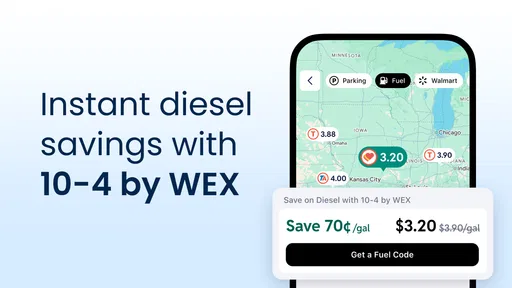
Fuel search and price comparisons are most useful when they support a plan, rather than when the gauge is already low and every minute feels pressing. I’d look along the route for a practical candidate, then weigh price against the extra driving and the fit with my schedule. A cheaper option is not automatically the better stop if reaching it means a significant diversion or a less convenient place to take a break.
Parking calls for the same kind of judgment. Trucker Path can help locate truck stops, rest areas, and Walmart locations, but a result on a map is not a guarantee that a space will be available when you arrive. I’d use the app to identify alternatives early, especially near the end of a long driving window, and keep a backup in mind rather than pinning the whole plan on one location. That simple habit makes the parking search less stressful without assuming that availability is fixed.
Use shared reports as context, not certainty
Community contributions add a useful human perspective to route planning. A driver’s note can flag a closure, a tricky approach, or another detail that a basic route line does not communicate well. I find this kind of information valuable precisely because it can prompt a second look before a turn or stop, rather than because every report should be treated as authoritative.
Reports can become outdated as conditions change, so I would check when and where a note applies and compare it with current signs and official instructions. The best use is as an extra layer of awareness: if several pieces of information suggest a problem, reassess the plan; if a comment is vague or old, don’t let it overrule what you can verify on the road.
Your Ultimate Road Companion
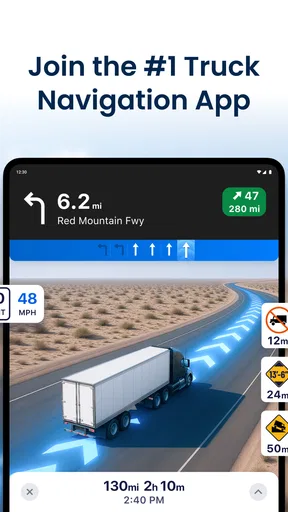
Ever found yourself stuck because your regular GPS didn’t account for the size of your rig? That’s a headache you can avoid with Trucker Path. This app is specifically designed with truckers in mind, offering truck-specific navigation that considers clearance heights, weight limits, and other critical factors.
One of the first things I noticed was how intuitive the interface is. You don’t need to be a tech wizard to figure it out. Just tap, type, and you’re on your way. The app provides accurate routes tailored for trucks, so you avoid those frustrating detours that regular GPS systems love to send you on.
Fuel Stops and Parking Made Easy
Finding a place to refuel or park can sometimes feel like hunting for a unicorn. But this app makes it a breeze. With real-time updates, you can locate fuel stops and compare prices along your route. It’s a lifesaver for managing your expenses.
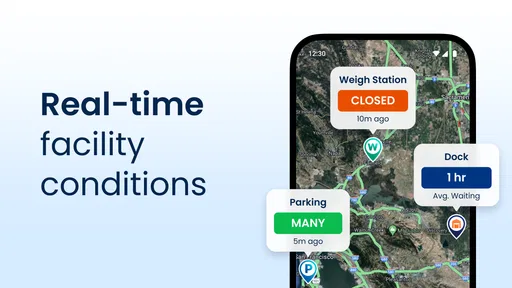
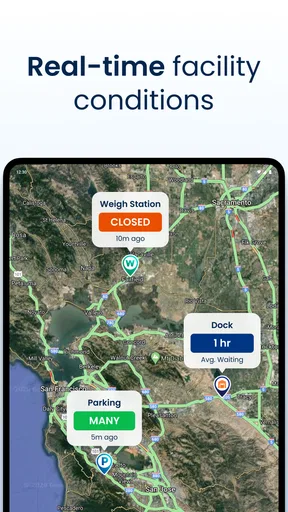
Parking is another pain point that Trucker Path handles beautifully. The app shows you available parking spots at truck stops, rest areas, and even Walmart locations. And let’s be honest, knowing where you can catch some shut-eye without stress is worth its weight in gold.
Community-Powered Insights
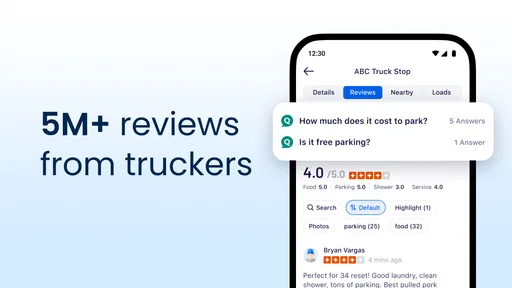
One of my favorite features is the community aspect. Fellow truckers share insights and updates, which means you’re not just relying on algorithms. You get the human touch, with reviews and tips from folks who’ve been there, done that.
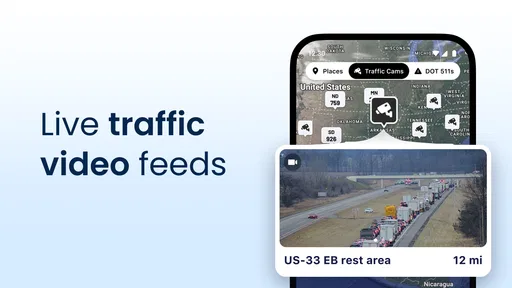
Whether it’s a heads-up about upcoming weather conditions or alerts about road closures, these real-time updates are invaluable. It’s like having a network of buddies out on the road with you, looking out for your best interests.
Extra Features That Go the Extra Mile
Aside from navigation and community insights, the app offers a slew of other handy features. Need to weigh your truck? No problem. The app can guide you to the nearest weigh station. Hungry? You can find restaurants that accommodate big rigs.
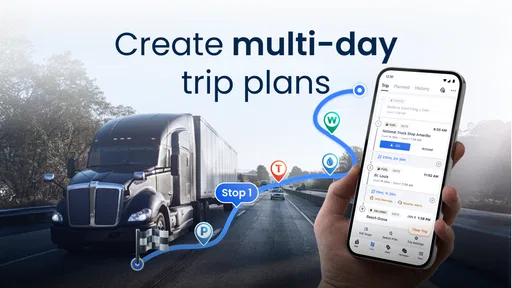
Plus, the app’s trip planner is a game-changer. Plot your route, schedule stops, and even estimate fuel costs. It’s like having a personal assistant dedicated to making your trip as smooth as possible.
Check the practical details before relying on it
The app is a free download, with in-app purchases listed from $1.99 to $299.99 per item, so I’d check what a particular purchase offers and whether it suits my needs before paying. Trucker Path is made by Trucker Path and sits in the maps and navigation category. It has a 4.8 average from around 72,000 ratings, with roughly 22,000 written reviews and over a million installs. Those figures suggest an established audience, though they can’t tell you whether its route suggestions fit your truck or your regular lanes.
It is rated for Everyone, and the current version is 6.8.9, with Android 8.0 as the minimum operating system. Those are useful compatibility checks before installing on an older device. Since this is a driving tool, I’d also set up a route and examine the screen while parked; learning where fuel, parking, and route planning sit before moving is a safer and less distracting way to build a repeatable routine.
Where it fits—and where another tool may be better
For a professional driver who regularly needs truck-aware routing and wants fuel, parking, and weigh-station information close at hand, this app has a clear purpose. It can also help an occasional truck renter think through vehicle-specific route choices instead of assuming a car map is suitable. A realistic use would be planning a delivery the evening before: check the route, identify a fuel option and a couple of possible places to park, then review community notes before leaving. On the day, those preparations give you options if a stop is full or the road situation changes.
A standard navigation app may be simpler for someone driving a car, making a short trip, or looking for broad everyday directions without truck-specific needs. It may also be preferable when a driver’s established professional system is already required by their work or better suited to a particular fleet’s procedures. I would not use Trucker Path as the sole authority for legal restrictions, live availability, or road conditions. Its advantage is bringing truck-oriented planning and driver contributions together; its trade-off is that those sources still need interpretation and checking.
Build a repeatable routine, not a blind habit
The most useful way to get comfortable with the app is to make a few checks part of the same pre-trip routine: confirm the destination and route, look at likely fuel and rest options, and note a backup for any stop that would be inconvenient to miss. If a community report affects the route, treat it as a prompt to verify rather than a command. This avoids a common planning mistake: trusting a single appealing result without considering the detour, timing, or whether the information still applies.
I’d also keep the route-planning stage separate from the driving stage. Set up the trip while stopped, then make changes only when it is safe to do so. That may sound basic, but an app with several useful categories can tempt a driver to keep browsing while underway. The benefit comes from making decisions earlier, not from repeatedly checking every option in motion.
Final Thoughts
In the world of trucking, time is money, and peace of mind is priceless. Trucker Path: Truck GPS & Fuel is more than just an app; it’s a comprehensive tool designed to make your life on the road easier, safer, and more efficient. Whether you’re a seasoned road warrior or just starting your trucking journey, this app is worth a spot on your home screen.
So, if you’re ready to hit the road with a little extra confidence, you might want to give Trucker Path a try. It’s like having a reliable friend riding shotgun, and who wouldn’t want that?
Privacy and Permissions
See what permissions an app requests and how it handles your data.
- Contacts
- read your contacts
- Location
- approximate location (network-based), precise location (GPS and network-based)
- Phone
- directly call phone numbers, read phone status and identity
- Photos/Media/Files
- access USB storage filesystem, read the contents of your USB storage, modify or delete the contents of your USB storage
- Storage
- read the contents of your USB storage, modify or delete the contents of your USB storage
- Camera
- take pictures and videos
- Microphone
- record audio
- Wi-Fi connection information
- view Wi-Fi connections
- Device ID & call information
- read phone status and identity
- Other
- view network connections, full network access, run at startup, draw over other apps, control vibration, prevent device from sleeping, Google Play license check, read Google service configuration
Verdict
Strengths of Trucker Path: Truck GPS & Fuel
- User-friendly interface for easy navigation.
- Real-time updates on truck stops and weigh stations.
- Customizable routes for different truck sizes.
- Fuel price comparisons save money on the road.
- Community-driven feedback enhances reliability.
Limitations of Trucker Path: Truck GPS & Fuel
- Occasional GPS inaccuracies in remote areas.
- Premium features require a subscription.
- High battery usage during long trips.
- Limited offline functionality.
- Some ads in the free version.
Other Releases by Trucker Path
View All
Trucker Path Load Board
Maps & Navigation4.3
Similar Picks in This Category
View All
Uber - Request a ride
Uber Technologies, Inc.4.7


inDrive. Rides with fair fares
® SUOL INNOVATIONS LTD4.8

Yandex Go: Taxi Food Delivery
Mikromobilnost LLC Belgrade4.8

Bolt: Request a Ride
Bolt Technology4.8

Rapido: Bike-Taxi, Auto & Cabs
Rapido Bike Taxi4.8
Frequently Asked Questions
What is Trucker Path: Truck GPS & Fuel used for?
Trucker Path is a comprehensive navigation app designed specifically for truck drivers. It provides GPS navigation tailored for trucks, highlighting truck-friendly routes and avoiding low bridges or restricted areas. Additionally, it offers features like locating truck stops, weigh stations, rest areas, and real-time updates on fuel prices, making it an essential tool for professional truckers.
Is Trucker Path available for both Android and iOS devices?
Yes, Trucker Path is available for download on both Android and iOS platforms. It is accessible through the Google Play Store for Android users and the Apple App Store for iOS users. This cross-platform availability ensures that truck drivers can use the app regardless of their preferred smartphone operating system.
Does Trucker Path require a subscription for full access?
Trucker Path offers both free and premium subscription options. While the free version provides basic navigation and some features, the premium subscription unlocks advanced options such as traffic updates, exclusive truck stops, and enhanced route planning. Users can choose the plan that best fits their needs and budget for a more tailored experience.
How accurate is the fuel price information on Trucker Path?
The fuel price information on Trucker Path is updated in real-time, thanks to contributions from a large community of users and verified sources. While the app strives for accuracy, prices can vary due to market fluctuations or delays in updates. Users are encouraged to verify prices directly at stations when possible.
Can Trucker Path be used offline?
Trucker Path does offer offline capabilities. Users can download maps and routes in advance to navigate without an internet connection. This feature is especially useful in areas with poor connectivity, ensuring that truck drivers can still access essential navigation tools and route information when needed.
